Updated: 2026.5.1 FortiOS: 7.6.6
| Contents |
Basic (Replacing L3 Switch with Fortigate)
 |
PC1 and PC2 are communicating as shown in the first diagram below. In this verification, a C891 is used as the L2 switch. When the L3 switch is replaced with a Fortigate from this state, the configuration becomes as shown in the second diagram. |
[Before replacement]

[After replacement]

 |
So, SVI10 and SoftSW10 are similar things, right? |
|
They are similar in some ways, but they are not exactly the same. For example, an SVI (Switch Virtual Interface) does not need to be bound to a physical interface, whereas a Software SW does require binding. With that said, here is the configuration. |
Configuration > FG60F-1
| Create a VLAN interface for VLAN10 (named int2_VLAN10 in this example). ※ The address object that is automatically created (named int2_VLAN10\ address in this example) must be deleted. |
| config system interface edit int2_VLAN10 set vdom root set vlanid 10 set interface internal2 next end config firewall address delete int2_VLAN10\ address end |
| Create a Software SW for VLAN10 (named SoftSW10 in this example), and add internal1 and int2_VLAN10 as members. Also assign an IP address to SoftSW10. |
| config system switch-interface edit SoftSW10 set vdom root set member internal1 int2_VLAN10 end config system interface edit SoftSW10 set ip 172.16.10.240/24 set allowaccess ping next end |
※ Items in bold can be any name you choose.
Verification
| Ping from PC1 (172.16.10.1) to PC2 (172.16.10.2) — Success |
| >ping 172.16.10.2 Pinging 172.16.10.2 with 32 bytes of data: Reply from 172.16.10.2: bytes=32 time<1ms TTL=255 Reply from 172.16.10.2: bytes=32 time<1ms TTL=255 Reply from 172.16.10.2: bytes=32 time<1ms TTL=255 |
| Ping from PC1 (172.16.10.1) to FG60F SoftSW10 (172.16.10.240) — Success |
| >ping 172.16.10.240 Pinging 172.16.10.240 with 32 bytes of data: Reply from 172.16.10.240: bytes=32 time<1ms TTL=255 Reply from 172.16.10.240: bytes=32 time<1ms TTL=255 Reply from 172.16.10.240: bytes=32 time<1ms TTL=255 |
|
It worked successfully. By the way, do we not need to configure a firewall allow policy? |
|
Right. Communication between interfaces that belong to the same Software SW is permitted by default. (It can also be denied if needed.) |
|
I see. Though, having to manually delete the automatically created address object is a bit of a hassle. |
|
You're right. It wasn't auto-created in older OS versions, but it is now. |
Advanced (Inter-VLAN Routing)
|
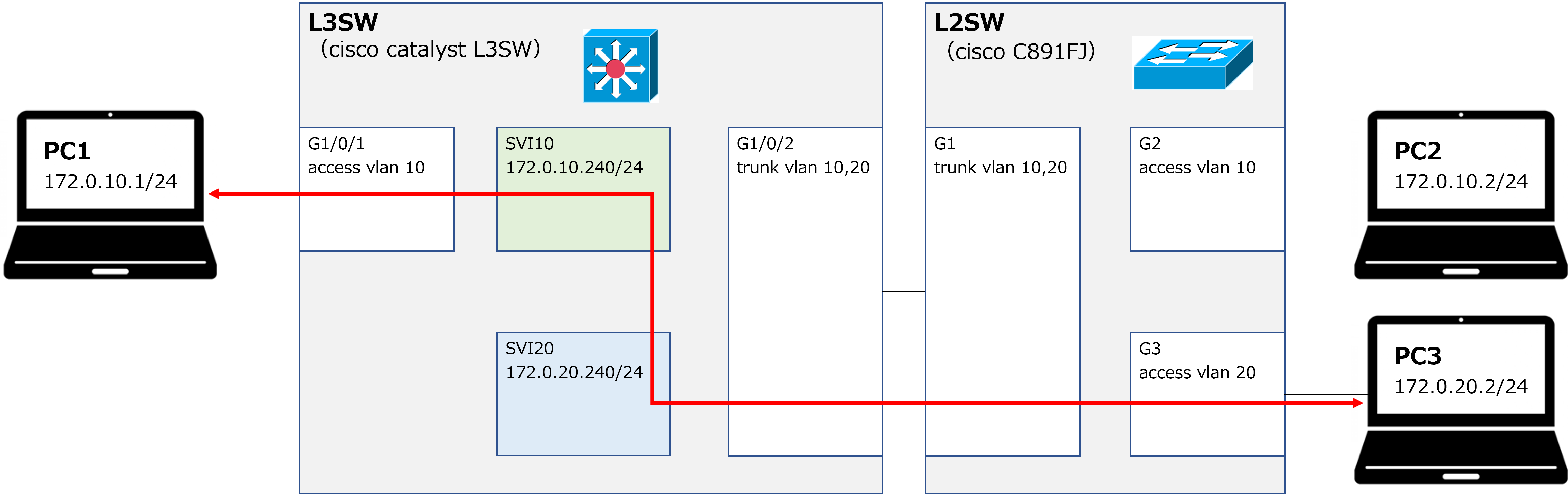
PC1 and PC3 are communicating as shown in the first diagram below. We will now replace the L3 switch with a Fortigate. The result is shown in the second diagram. |
[Before replacement]
[After replacement]
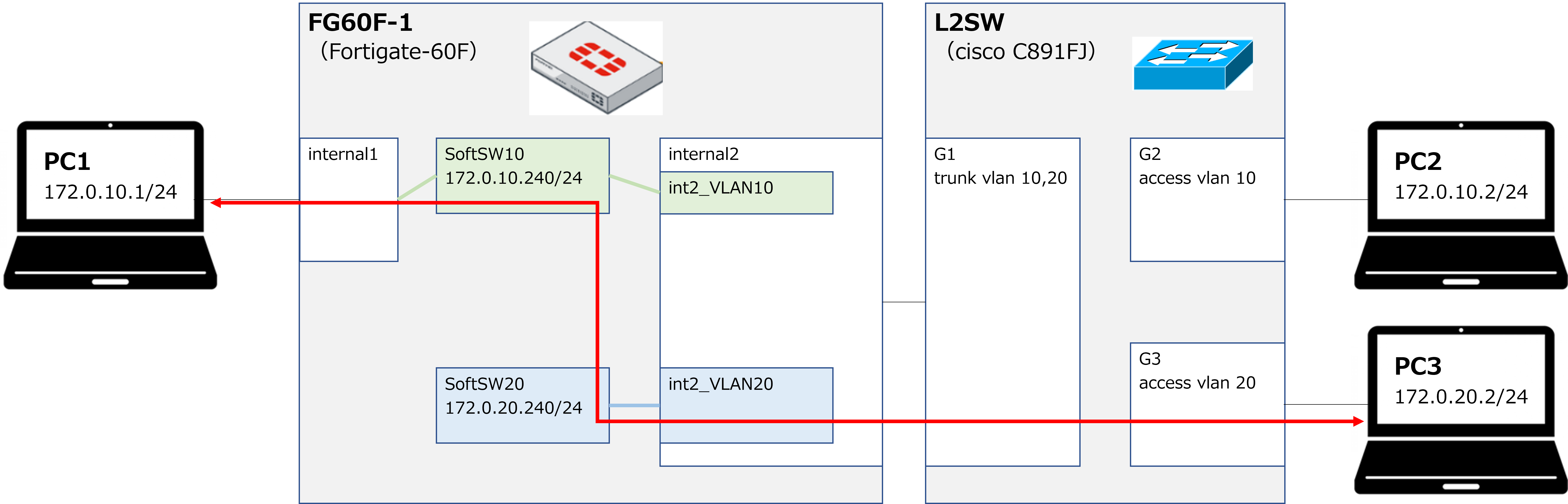
Additional Configuration > FG60F-1
| Create a VLAN interface for VLAN20 (named int2_VLAN20 in this example). ※ The address object that is automatically created (named int2_VLAN20\ address in this example) must be deleted. |
| config system interface edit int2_VLAN20 set vdom root set vlanid 20 set interface internal2 next end config firewall address delete int2_VLAN20\ address end |
| Create a Software SW for VLAN20 (named SoftSW20 in this example), and add int2_VLAN20 as a member. Also assign an IP address to SoftSW20. |
| config system switch-interface edit SoftSW20 set vdom root set member int2_VLAN20 end config system interface edit SoftSW20 set ip 172.16.20.240/24 set allowaccess ping next end |
| Configure a firewall policy to allow traffic between SoftSW10 and SoftSW20. Also create address objects. |
| config firewall address edit 172.16.10.0/24_VLAN10 set subnet 172.16.10.0/24 next edit 172.16.20.0/24_VLAN20 set subnet 172.16.20.0/24 next end config firewall policy edit 10 set name VLAN10_>_VLAN20 set srcintf SoftSW10 set dstintf SoftSW20 set srcaddr 172.16.10.0/24_VLAN10 set dstaddr 172.16.20.0/24_VLAN20 set action accept set schedule always set service ALL set logtraffic all next edit 20 set name VLAN20_>_VLAN10 set srcintf SoftSW20 set dstintf SoftSW10 set srcaddr 172.16.20.0/24_VLAN20 set dstaddr 172.16.10.0/24_VLAN10 set action accept set schedule always set service ALL set logtraffic all next end |
※ Items in bold can be any name you choose.
|
So for the firewall policy's srcintf and dstintf, we just use the Software SW name itself — we don't need to specify the individual member interface names? |
|
That's correct. |
Verification
| Ping from PC1 (172.16.10.1) to PC3 (172.16.20.2) — Success |
| >ping 172.16.20.2 Pinging 172.16.20.2 with 32 bytes of data: Reply from 172.16.20.2: bytes=32 time<1ms TTL=254 Reply from 172.16.20.2: bytes=32 time<1ms TTL=254 Reply from 172.16.20.2: bytes=32 time<1ms TTL=254 |
| Traceroute from PC1 (172.16.10.1) to PC3 (172.16.20.2) |
| >tracert -d 172.16.20.2 Tracing route to 172.16.20.2 over a maximum of 30 hops 1 <1 ms <1 ms <1 ms 172.16.10.240 2 <1 ms <1 ms <1 ms 172.16.20.2 |
|
Looking at the traceroute result, the first hop is the SoftSW10 address, which confirms that routing from VLAN10 to VLAN20 is working as expected. By the way, what would happen if we didn't assign an IP address to SoftSW — similar to not creating an SVI on a Catalyst switch? |
|
In that case, communication within the same VLAN would still work, but communication between different VLANs would not. |
|
I see — just like how inter-VLAN routing doesn't work without an SVI. |
|
Exactly. That's all for today. Thank you for reading! |