Last updated: 2026.7.15
| Contents of this page |
What is SASE?
 |
Starting today, we'll spend a while looking at Cisco's SASE product, Cisco Secure Access. |
 |
Um, what exactly is SASE? |
|
There are already plenty of blogs and YouTube videos explaining SASE (Secure Access Service Edge), but let me first give you my own take on it. |
|
Keep it as simple as possible, please! |
|
Sure. As a test, I searched "What is SASE?" online and got an answer along these lines: SASE is an architecture/service model that integrates network functions (such as SD-WAN) and security functions (SWG, ZTNA, CASB, FWaaS, etc.) in the cloud, allowing secure access to corporate systems and cloud services from anywhere. It is positioned as the next-generation network security approach of the zero-trust era, replacing the traditional model of "concentrating and protecting everything on-premises." |
|
I don't understand that at all! |
|
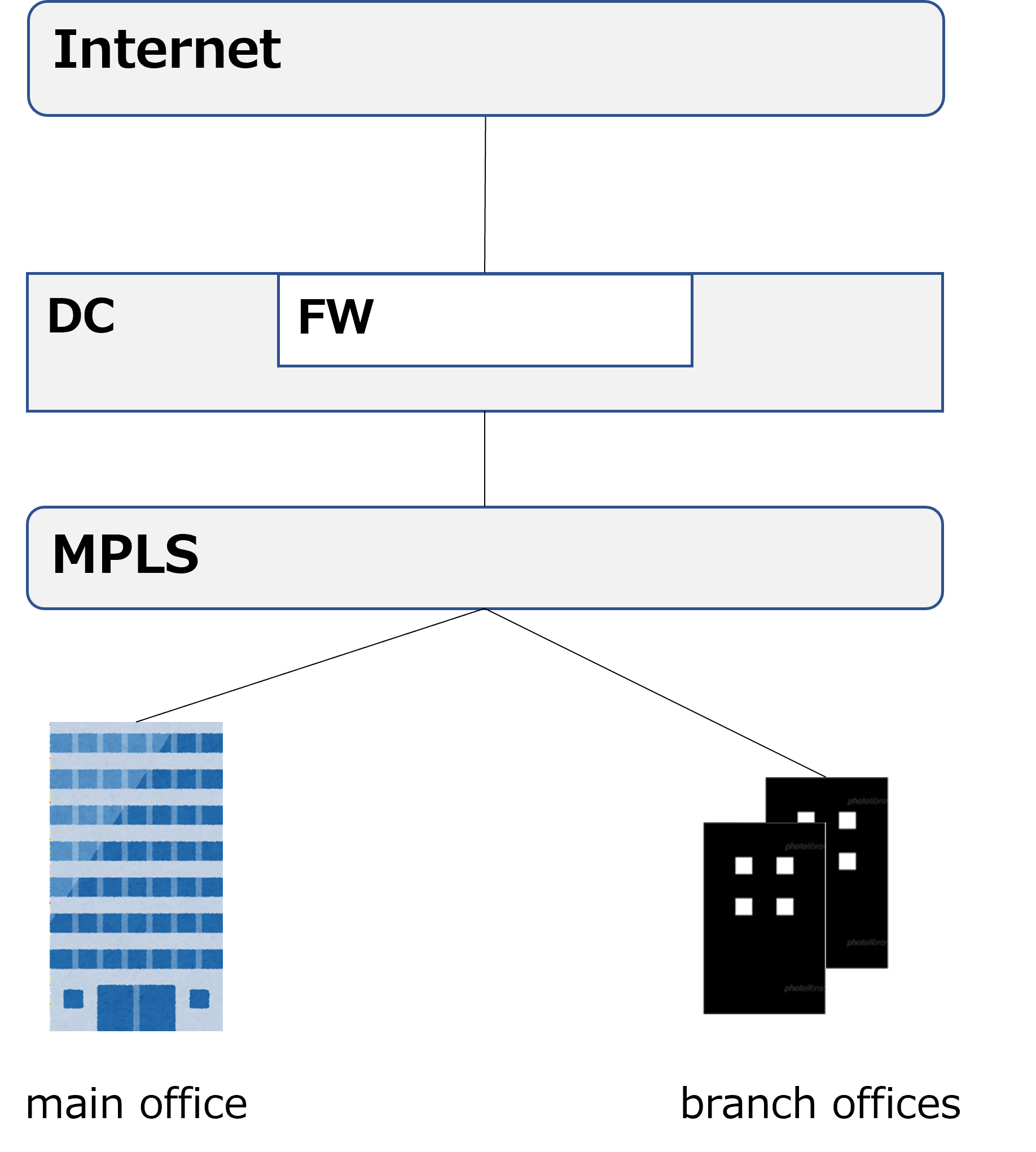
Right. I think it's easier to understand if we compare it with how corporate networks looked before SASE came along. Take a look at the diagram below. Until around 2015, this was a common network setup for many companies. |
|
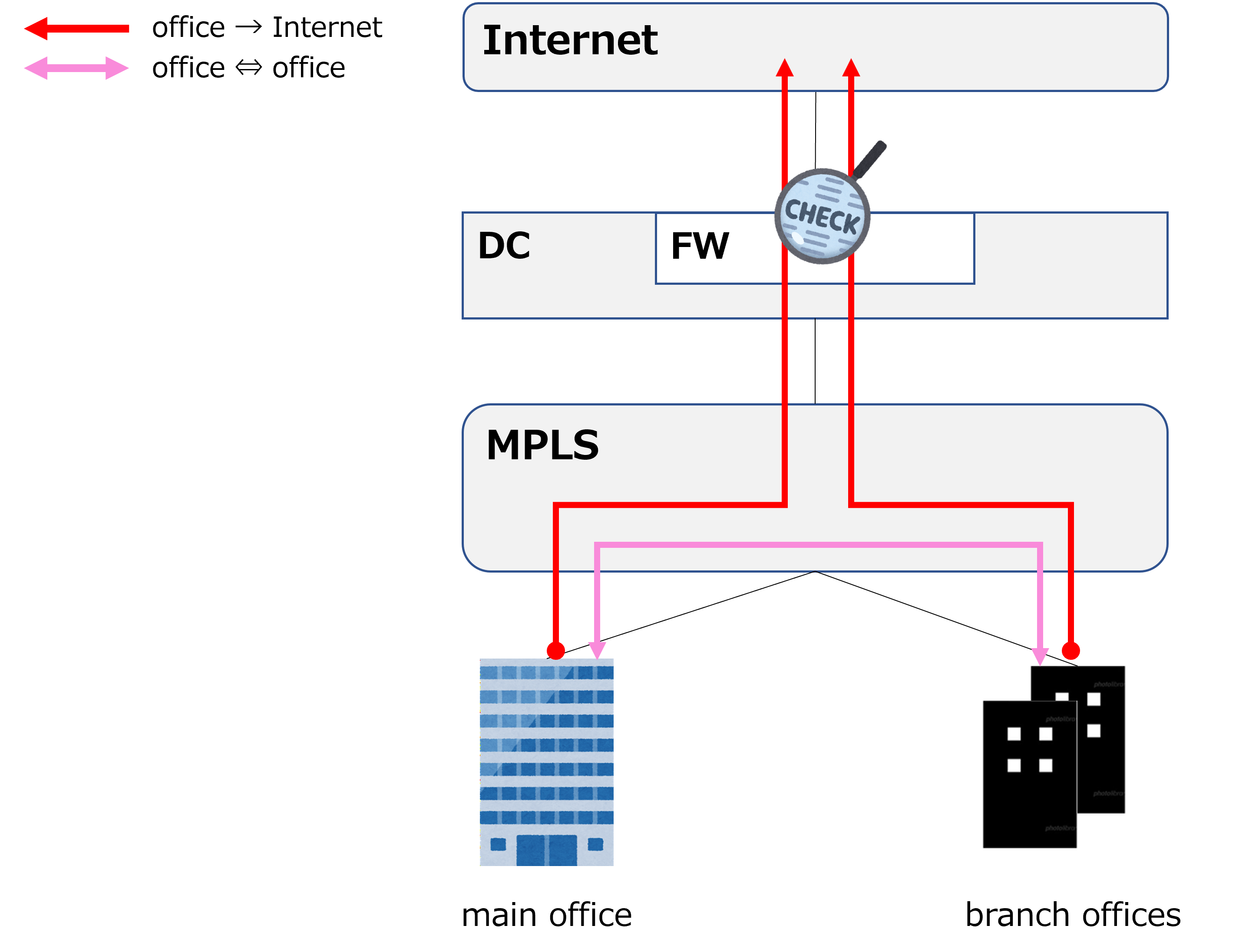
So, each site (main office and branch offices) connects to an MPLS network. Then there's a DC (Data Center) between the MPLS network and the internet, and the firewall (FW) sits inside the DC. In that case, would the paths for internet traffic and inter-site traffic look something like the diagram below? |
|
Thanks, exactly right. All internet-bound traffic was funneled into the DC, inspected by the DC's firewall, and then sent out to the internet. |
|
So the DC firewall acted like a gatekeeper. Was there some problem with this design? |
|
Yes. From around 2015, more and more companies started using cloud services like M365 and Box. Cloud services are typically accessed over the internet, so as cloud usage grew, so did the volume of internet-bound traffic. |
|
In other words, the red arrow for internet traffic in the diagram above just kept growing! |
|
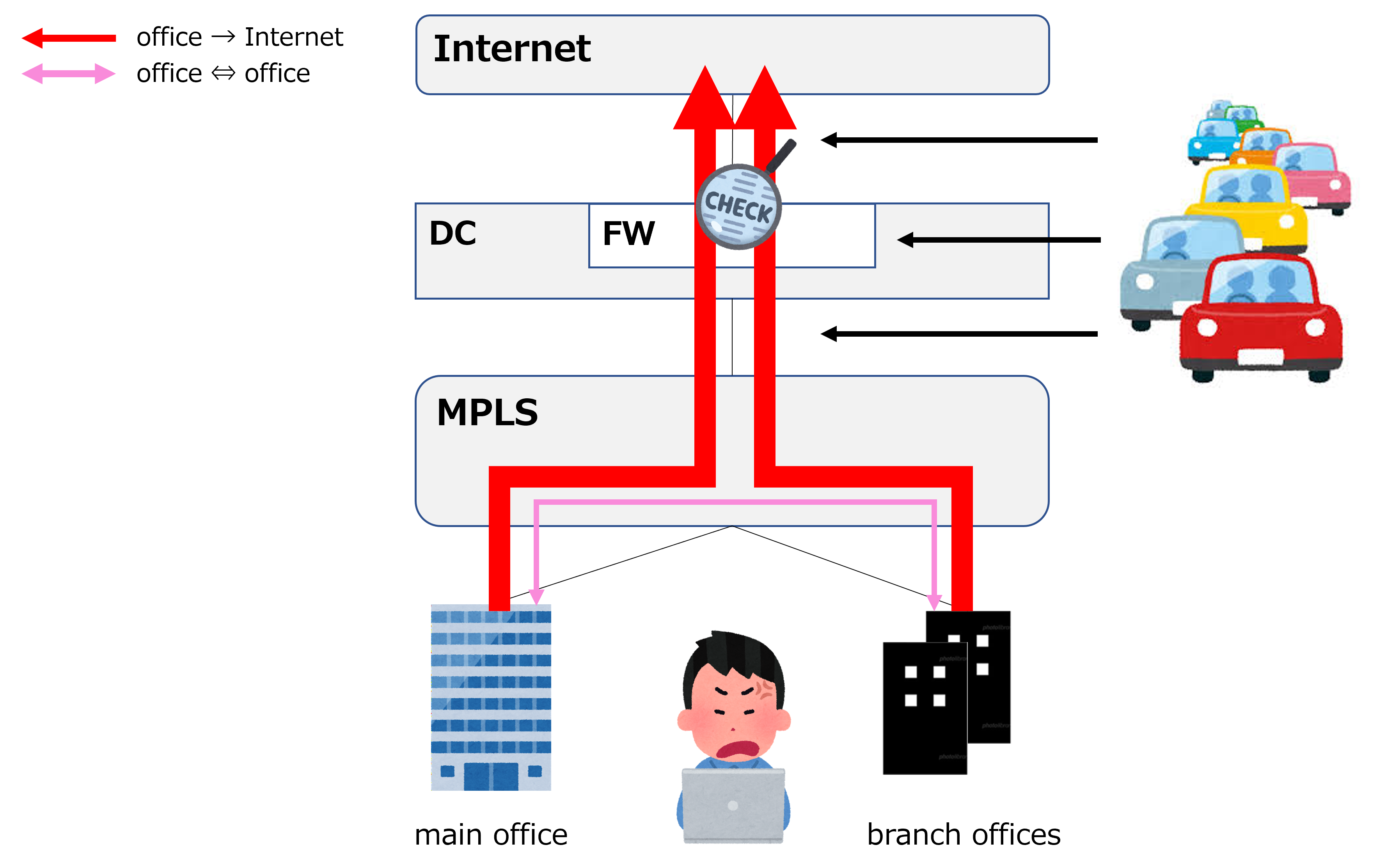
That's right. And that led to the situation shown in the diagram below. |
|
Hm? Is the thicker red arrow for internet-bound traffic meant to represent increased traffic volume? |
|
Exactly. As a result, the MPLS-to-FW-to-internet path shown by the black arrows became overloaded, causing congestion. |
|
I see. So users at each site started experiencing slow internet access, and that's why their faces look so frustrated. |
|
Right. So, how do you think this situation could be resolved? |
|
Hmm, couldn't you just increase the bandwidth of the DC's line, or upgrade the firewall to a higher-spec device? |
|
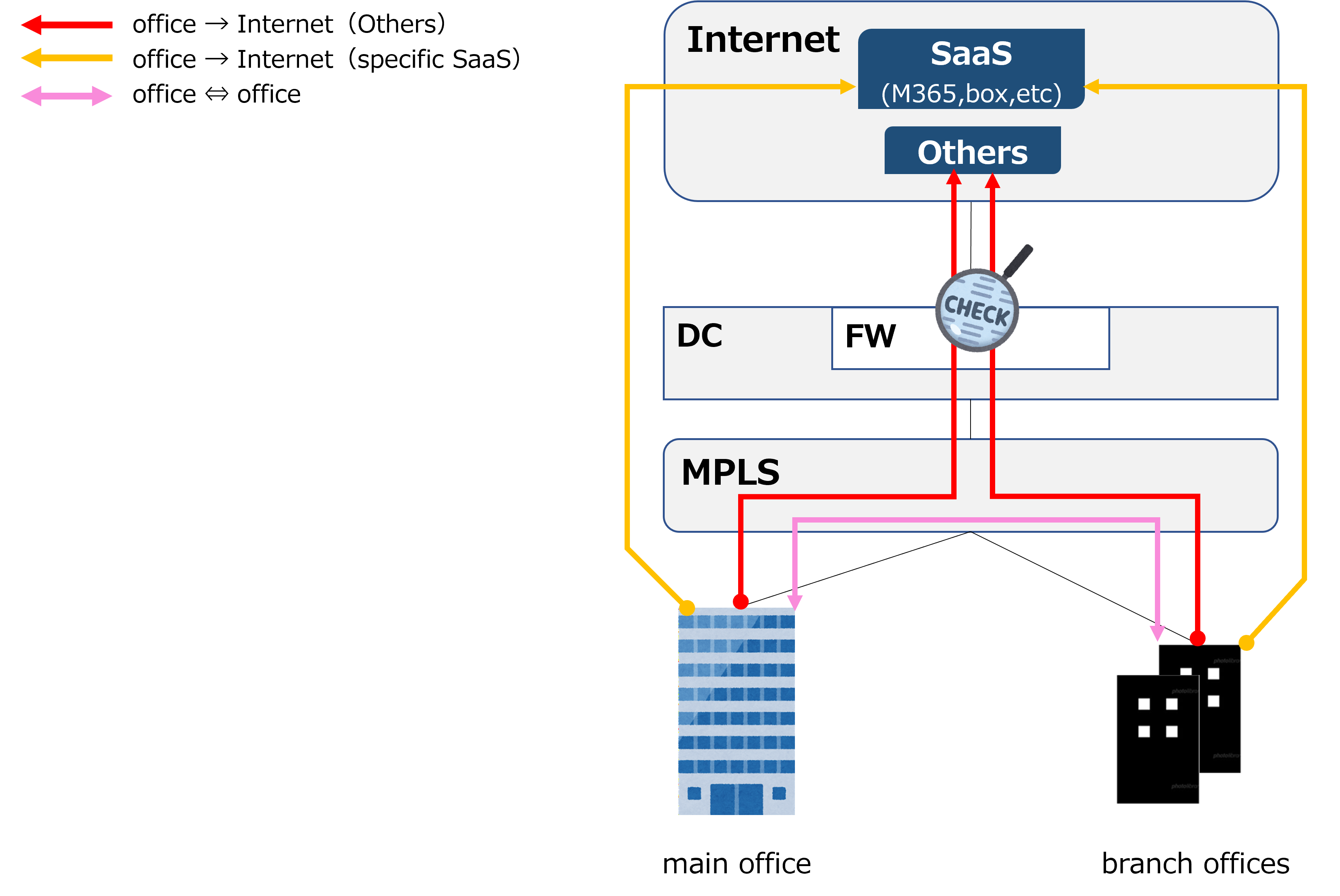
That's true, but both increasing bandwidth and strengthening the firewall cost money. Plus, routing everything through the DC means a longer detour, which increases latency too. That's why a design like the one below emerged. |
|
Ah, I see. So in addition to the MPLS line, each site also gets its own internet line, and traffic to specific SaaS destinations goes straight out to the internet, as shown by the orange arrow. |
|
Right. Sending traffic directly to the internet like this is called LBO (Local BreakOut). Traffic that goes through LBO bypasses the firewall entirely, so it isn't inspected. That's why LBO is only used for traffic to specific SaaS destinations that are already known to be safe. |
|
Got it. So what happened after that? |
|
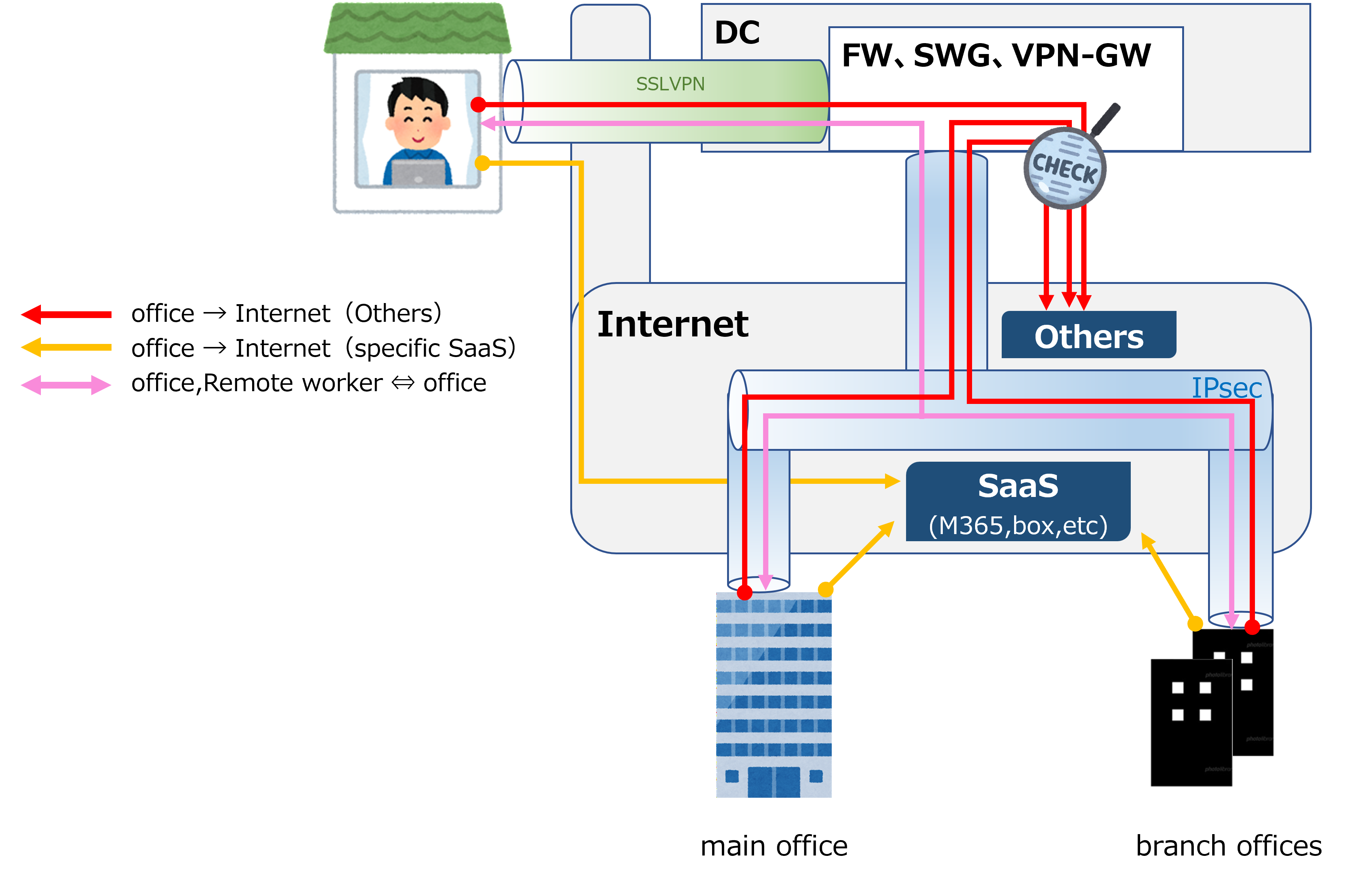
Well, on top of the growing use of cloud services, the COVID-19 pandemic in 2020 caused a surge in remote work (working from home). There was also growing demand to drop the expensive MPLS line entirely and keep only the internet line, instead of running both. As a result, more and more companies adopted the design shown below. |
|
This suddenly got a lot more complicated. Let's see, the MPLS network is gone. Remote workers connect to the DC's VPN-GW (VPN Gateway) using SSL VPN. Each site connects via IPsec tunnels. The split for internet-bound traffic is the same as before: specific SaaS traffic uses LBO, and everything else is inspected by the DC's firewall. |
|
That's right. This kind of network is often called SD-WAN (Software-Defined WAN). It gets this name because each site physically has only an internet line, but that single line is logically used for multiple purposes (internet traffic, internal traffic, and so on). |
|
Ah, SD-WAN is a term I hear a lot too. Is this design already outdated? |
|
No, not at all. I still think this design is one of the valid end goals, and if cost is the top priority, it's probably the strongest option. |
|
So that means there's another possible end goal? |
|
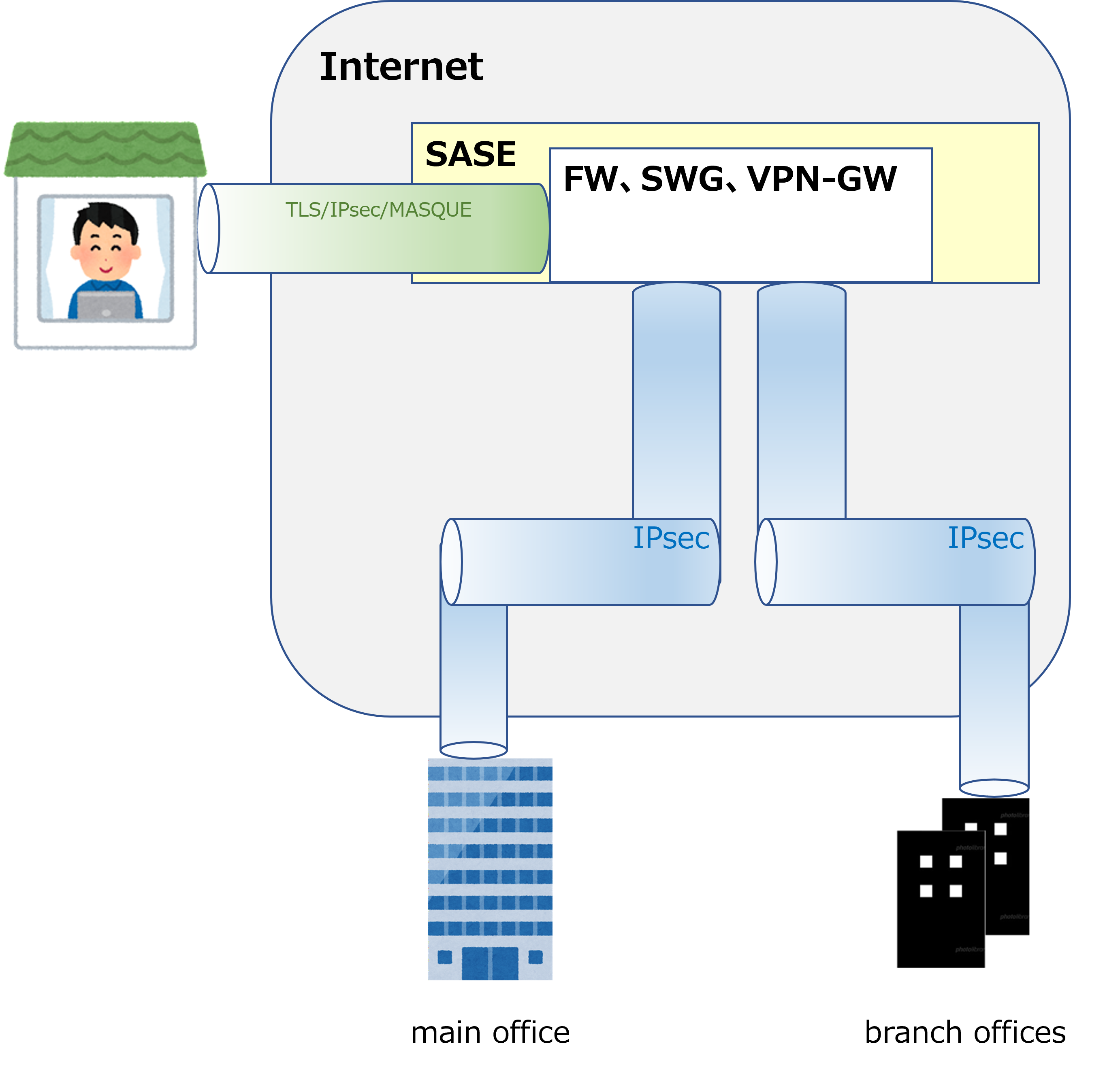
Yes, and that's SASE. A network design that adopts SASE looks like the diagram below. |
|
Hm? It doesn't look all that different. Did the DC just get replaced with SASE!? |
|
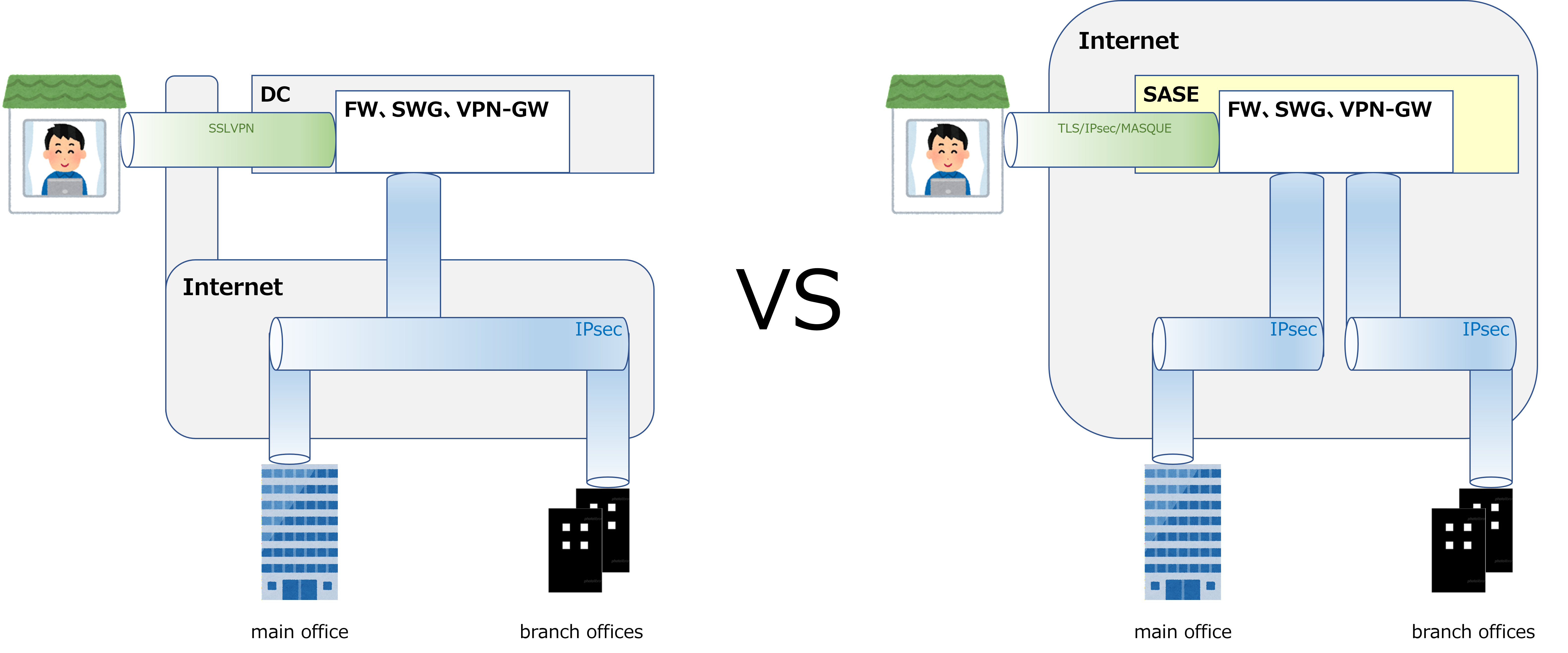
That's right. Of course there are various finer differences, but broadly speaking, that's really all it is. It's the same idea as moving a file server that used to sit on-premises (at a site or in the DC) to a cloud storage service like Box or Dropbox — SASE is what you get when you move the on-premises (DC) firewall, SWG, and VPN-GW into the cloud. |
|
I see. So then it really comes down to on-premises vs. SASE, as shown in the diagram below. |
On-prem vs SASE: Cost and Convenience
|
As for whether on-premises or SASE is better... The conclusion is that each has its own strengths, and neither is unconditionally better. As I mentioned earlier, I'd say on-premises wins if cost is the priority, while SASE wins if convenience is the priority. Let's start with cost. Very roughly speaking, SASE tends to cost about 3 to 10 times as much as an on-premises setup. For example, for a certain large manufacturing client I've been working with for several years, their running cost with an on-premises setup was around $200,000 a year (about 30 million yen), but switching to SASE easily pushed that above $1 million (about 150 million yen). |
|
Seriously!? That's way too expensive. |
|
Yeah. But the convenience is overwhelmingly better. With an on-premises setup, if a device fails, you have to arrange a replacement. You also need to define a response flow for cases where a failure is suspected. OS upgrades need to be done regularly (roughly once every one to two years). If a vulnerability is discovered, you may need to do an emergency upgrade too. And once a device reaches EoS (End of Support), you'll need to replace it with a new one. |
|
Wow, that sounds rough for the IT department. |
|
Exactly. But with SASE, none of that is needed, because the cloud service provider handles it for you. Many companies today are short-staffed in IT, so SASE tends to be especially attractive for those companies. |
|
I see. It's expensive, but that's incredibly appealing. It's kind of like the difference between a rental car and owning your own car. If you use it all the time, owning your own car is cheaper overall, but you have to handle things like oil changes and other maintenance yourself. |
|
Exactly right. |
On-prem vs SASE: Security
|
Besides cost and convenience, security is another important factor. My conclusion is that on paper, SASE offers stronger security. That said, with the right design, an on-premises setup doesn't have to fall far behind either. |
|
Hmm, tell me more. |
|
One of the main cyberattack methods is unauthorized intrusion from outside into the corporate network. That includes attackers impersonating remote workers to break into the corporate network via remote-access VPN. |
|
What happens if they get in? |
|
Important data gets stolen, files get encrypted without your consent so you can't access them, the AD server might get taken over... all sorts of things. |
|
That's terrifying. |
|
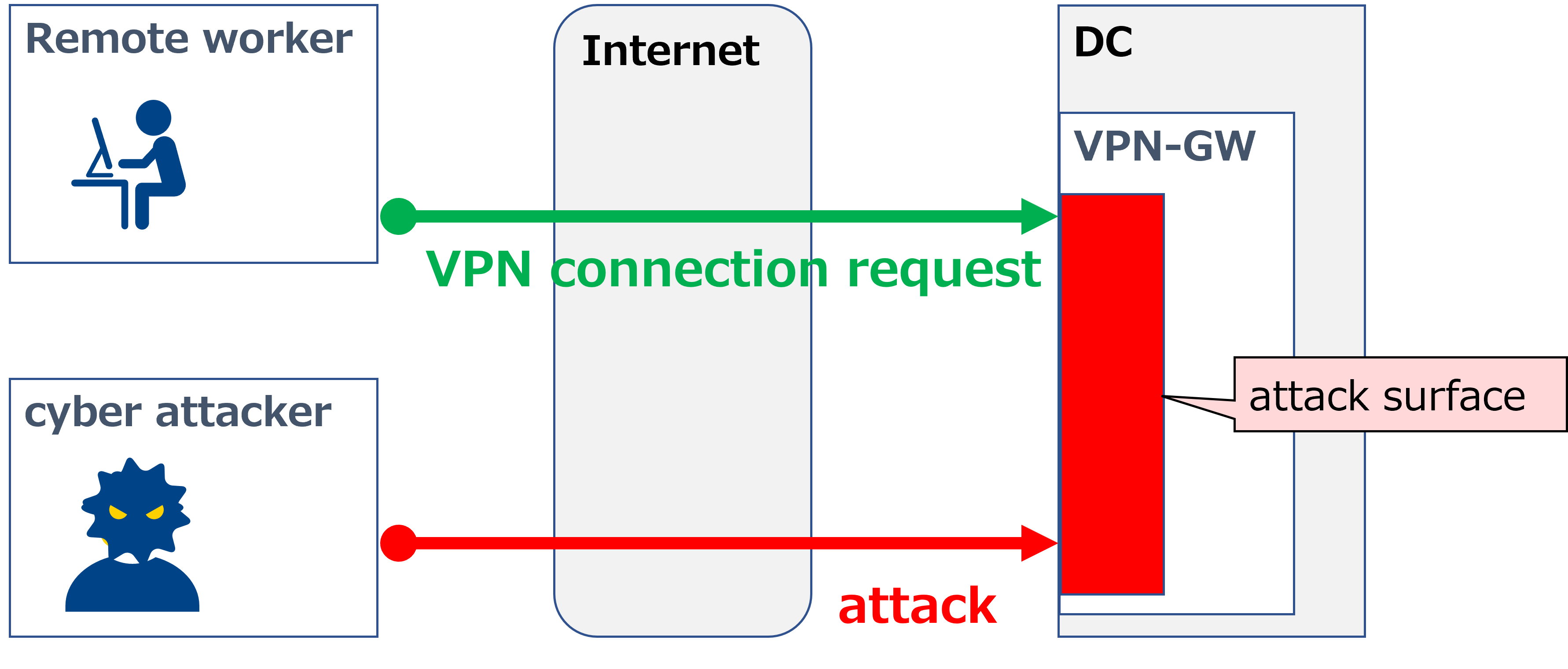
It really is. SASE is very resistant to this kind of intrusion, because it removes the attack surface from the corporate network itself. Take a look at the image below. Suppose an on-premises setup has a VPN-GW device placed in the DC. That VPN-GW has to accept VPN connection requests coming in from the internet. Of course, even after accepting a request, a VPN session won't actually be established unless authentication succeeds — but the fact that it has to accept the request in the first place is the big risk. Because it accepts requests, not only legitimate remote workers but also cyberattackers, as shown by the red arrow, will try to connect via VPN illegitimately. This is exactly why the internet-facing interface of the VPN-GW becomes an attack surface. |
|
I see. Does this actually get attacked in practice? |
|
Oh, it's very real. This is true for large enterprises, of course, but even the VPN-GW I run at home shows a constant stream of VPN connection request logs. I've got two-factor authentication in place, so I know I haven't actually been breached, but it's still unsettling. |
|
Seriously? That's scary. So how does this change with SASE? |
|
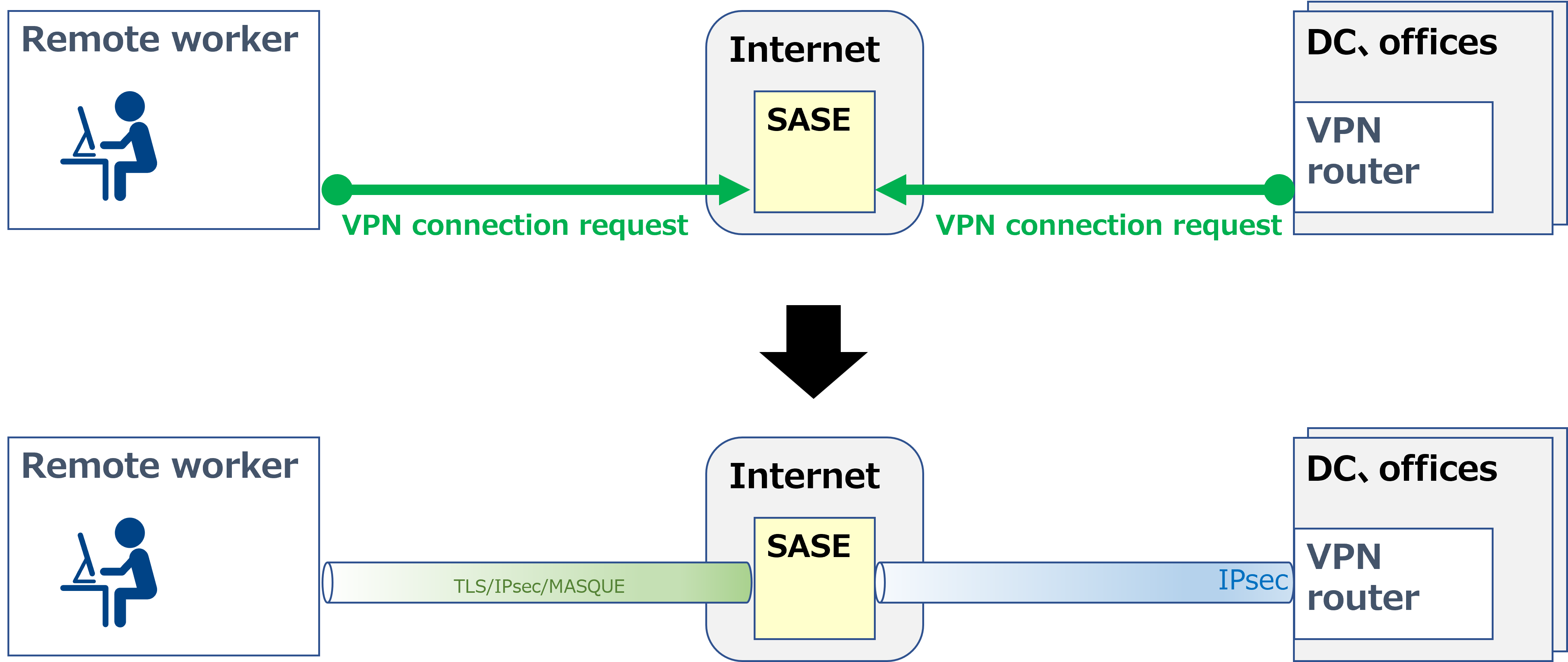
With SASE, remote workers never establish a VPN directly to a corporate VPN-GW; instead, SASE relays the connection in between. As shown in the first image above, the remote worker and the corporate (DC or office) VPN router each initiate a VPN connection request toward SASE from opposite sides, sandwiching it in the middle. Once the VPN is established, it looks like the second image, where the remote worker and the corporate network communicate through SASE acting as a relay. In other words, the corporate VPN router never even accepts VPN connection requests, so it has no attack surface. |
|
I see. But looking at the first image, SASE is the one accepting VPN connection requests, so doesn't that make SASE itself the attack surface? |
|
That's a fair point... but I think there's a big difference between a situation where a device you built and manage yourself on the corporate network is the attack surface, versus a situation where the corporate network itself has no attack surface at all. |
|
True. And even if an issue is found on the SASE side, the SASE provider will handle it too. So doesn't that mean SASE is overwhelmingly better for security? |
|
That's a point people might disagree on, but I don't think it's quite that one-sided. That's because enabling two-factor authentication already drastically reduces the risk of unauthorized intrusion. Depending on the data, two-factor authentication is said to reduce the risk of unauthorized intrusion by over 99%. |
|
I see. So it sounds like the right approach is to weigh cost against convenience and decide between SASE and on-premises based on that. |
|
That's right. Ah, there's actually one more factor to consider... |
On-prem vs SASE: Internet traffic when the firewall is far away
|
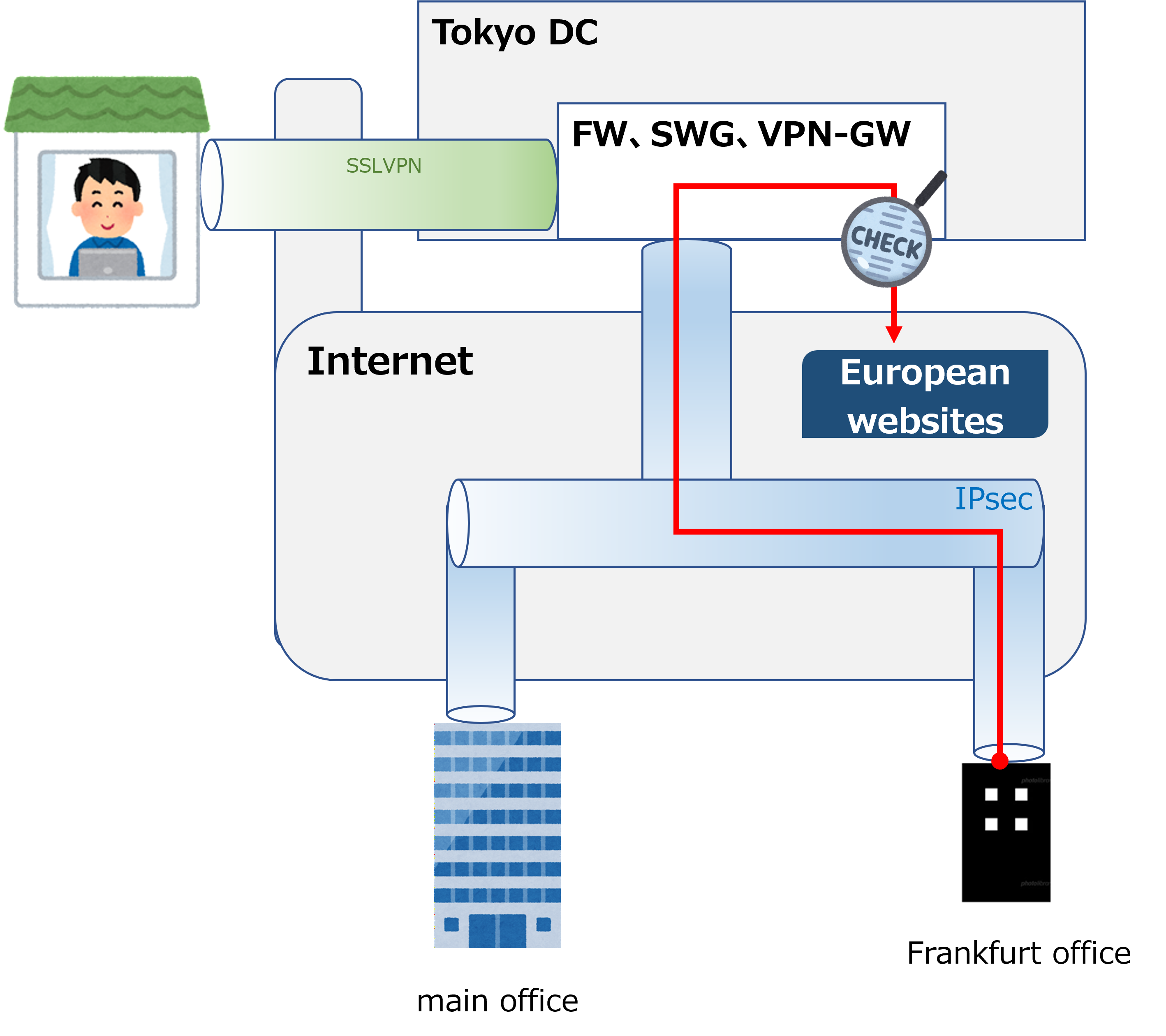
With an on-premises setup, distance can become a real bottleneck. For example, take the diagram below, where an office worker in Frankfurt is accessing a website in Europe. With an on-premises setup, traffic has to be inspected by the on-premises firewall, which in this case means it has to make a long detour through the firewall in the Tokyo DC. That long distance inevitably causes significant communication delay. |
|
Hmm, how much delay does this actually cause in practice? |
|
It depends on the network conditions, but I actually tested this exact traffic path a few months ago. Round-trip latency came out to around 250-500 msec. On paper that might not sound like much, but when you're actually clicking around in a browser, it felt sluggish enough to be genuinely stressful. |
|
If you had to deal with that every day at work, it would probably start to feel awful. Does SASE solve this? |
|
It does. |
|
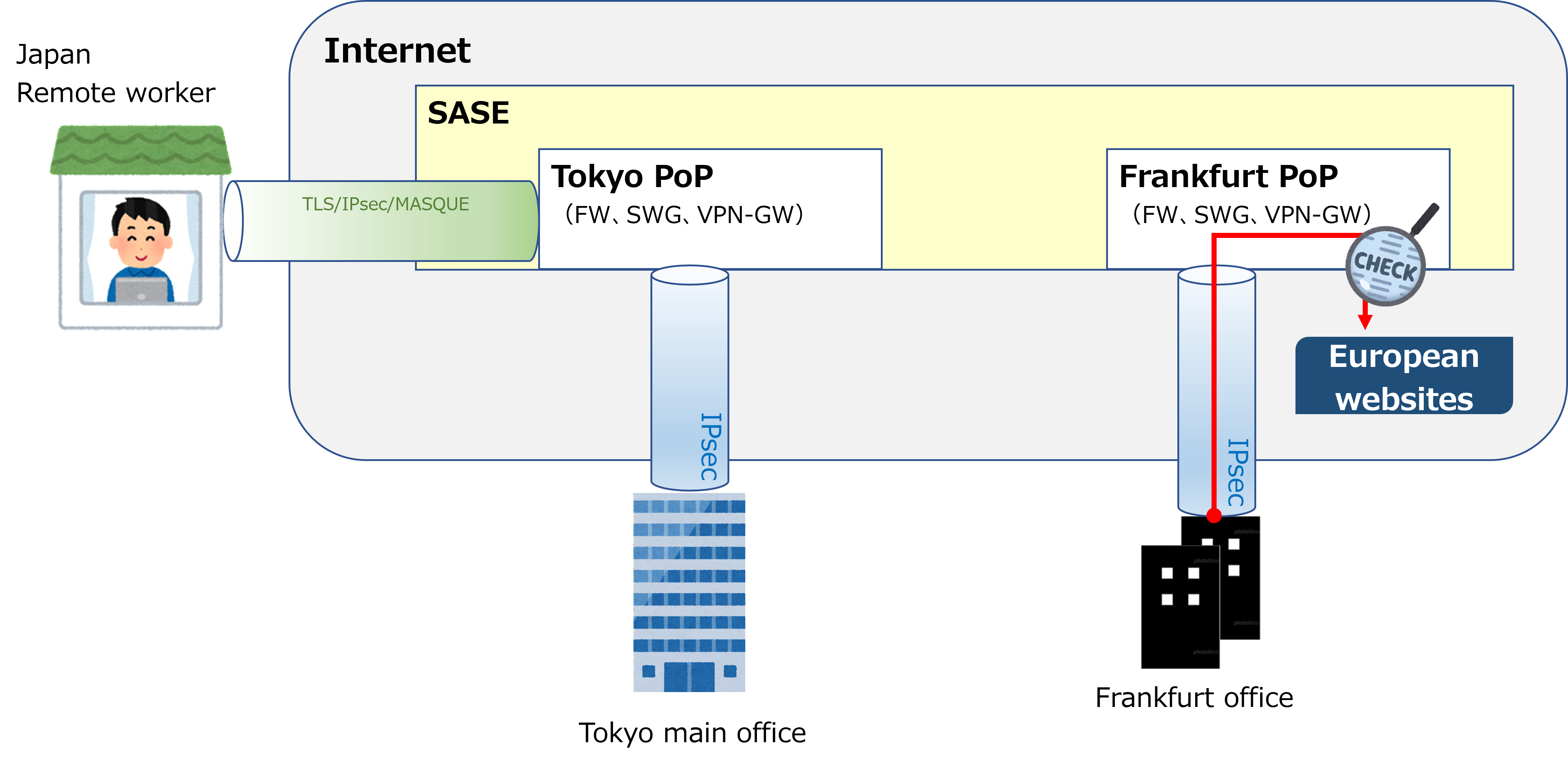
SASE is essentially a collection of firewalls and VPN-GWs scattered around the world. Typically, you connect to the nearest PoP (Point of Presence) to use the service. So the Frankfurt office connects to the nearest PoP, located in Frankfurt, gets inspected by the SWG inside that PoP, and then heads to the website. Unlike the on-premises setup, there's no long detour, so latency doesn't increase. |
|
I see. So for companies with a wide global footprint, SASE might really be the better choice. |
|
That's right. Although even with an on-premises setup, there's often a workaround — for example, applying LBO to frequently used sites so they don't have to route through a distant firewall — so it's not a completely clear-cut situation either way. Well, this ended up being pretty long, but that's all for this time. Thanks for reading all the way through. Next page we'll look at how to sync user information between Secure Access and Entra ID. |