Last updated: 2026.9.6
| Contents of this page |
Overview of Scenario 2
 |
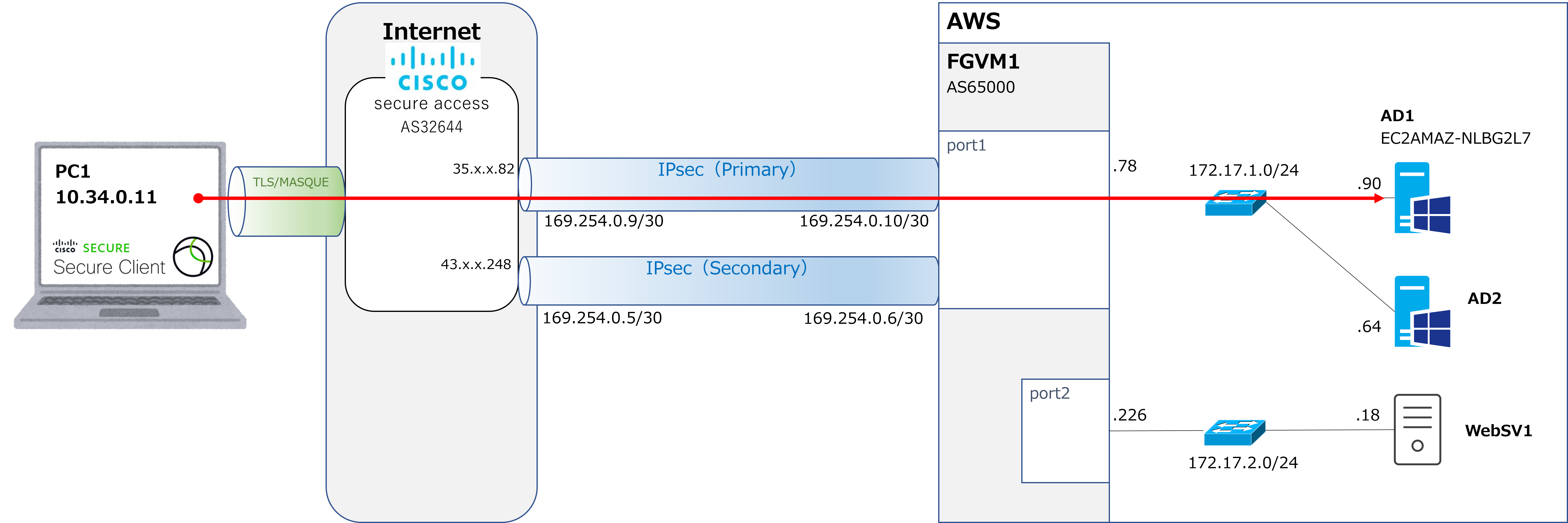
Starting this time, we'll cover Scenario 2: ZTNA-based remote access. In the previous Scenario 1, as shown in the diagram above, PC1 established a VPN (TLS) connection to Secure Access, and the FortiVM on AWS established an IPsec tunnel to Secure Access. Then, as shown by the red arrows, PC1 performed Ping and RDP connections to AD1 within AWS. |
 |
Yeah, that was really tough. |
|
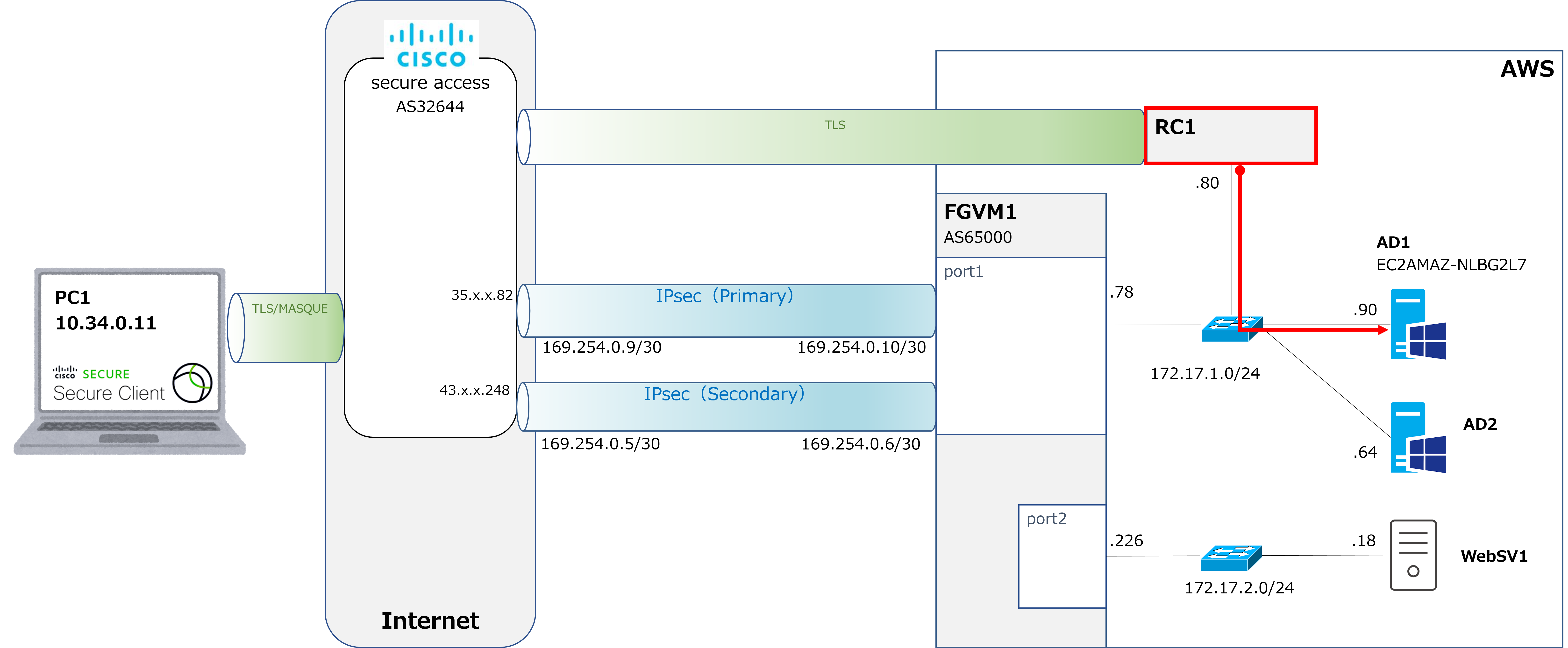
That's right. In Scenario 2, as shown in the diagram below, we'll set up an RC (Resource Connector) within AWS. Then, instead of PC1 accessing AD1 directly via a VPN like last time, RC1 will communicate with AD1 on PC1's behalf, as shown by the red arrow. |
|
Huh? Communicating on its behalf? So does that mean RC1 acts like a proxy server? |
|
That's right, but there's one slight difference. With a proxy server, the PC sends a packet addressed to the proxy server, like this: Source IP: PC Source IP: PC |
|
Hmm, that's tricky. But like a proxy server, PC1 still receives the result of the communication that RC1 carries out on its behalf, right? |
|
That's right. So when RC1 makes an RDP connection to AD1, the RDP session screen is displayed on PC1. |
|
Huh... It feels like something impressive is happening, but is it really necessary to go to all this trouble? PC1 can already communicate with AD1 via VPNaaS, so isn't this unnecessary? |
|
If VPNaaS is already in place, then strictly speaking, no, it isn't necessary. |
|
Huh? Oh, so that means there's also the option of not deploying VPNaaS at all, and using only this RC1-based proxy communication method instead. |
|
That's right. Cisco calls this method of having the RC communicate on the client's behalf ZTA (Zero Trust Access). However, in the SASE world—or the networking industry in general—this communication method is more commonly known as ZTNA (Zero Trust Network Access). |
|
Cisco always likes to come up with its own unique names for things, doesn't it? |
|
Yeah... true. |
|
Still, I always thought ZTNA was a term I heard a lot, and now I see that's what it refers to. So, which is better, the ZTNA approach or the VPNaaS approach? |
VPNaaS vs ZTNA
|
There's no such thing as VPNaaS or ZTNA being simply better or worse, but here's my personal assessment, as shown in the table below. |
| VPNaaS | ZTNA | |
| Ease of migration from an existing VPN | ◎ | × |
| Communication in the "remote access device ← internal network" direction | ○ | × |
| Security | ○ | ◎ |
| Convenience | ○ | ◎ |
|
I see, so each has its own strengths. |
|
That's right. Let's go through them one by one. For the first point, ease of migration from an existing VPN, the VPNaaS approach is overwhelmingly the more advantageous. Since VPNaaS is almost identical to a conventional VPN, just with a SASE (cloud) service acting as an intermediary, in many cases you can carry over the same traffic control rules that were applied to the existing VPN. |
|
And that's not the case with ZTNA? |
|
That's right. We'll look at the actual configuration screens later on, but you need to configure each destination application individually, which takes quite a lot of effort. Also, with the ZTNA approach, the source IP of packets arriving at the server is always the RC's IP address. Depending on the server, that may not be accepted, which can make it impossible to use the ZTNA approach. |
|
I see... |
|
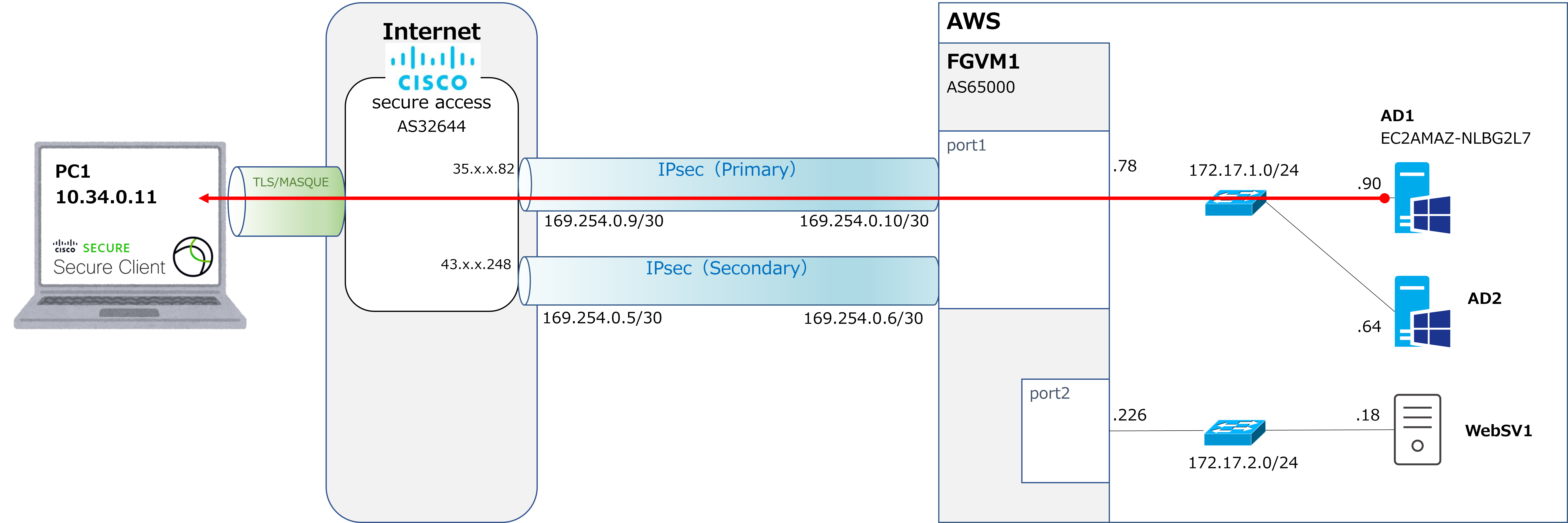
Next, the second point: communication in the "remote access device ← internal network" direction. This isn't possible with the ZTNA approach. For example, with the VPNaaS approach, as shown by the red arrow in the diagram below, it's possible for AD1 (172.17.1.90) to communicate with PC1 (10.34.0.11), as long as you configure an allow policy for it. |
|
However, with the ZTNA approach, the source IP of the communication shown by the red arrow is RC1 (172.17.1.80), so AD1 has no idea what PC1's IP address even is. That means AD1 can reply to communication that comes from RC1, but AD1 cannot initiate communication to PC1 on its own. |
|
I see. So if you need communication like "PC1 ← AD1"—that is, "remote access device ← internal server"—then you need VPNaaS, right? |
|
That's right. |
|
But in practice, is communication that originates from the server actually common? I'd think "client → server" communication is normal, but "client ← server" communication is pretty rare, isn't it? |
|
That's right, it's rare these days. In fact, some companies have no server-initiated communication at all, and just deploy the ZTNA approach on its own. But depending on the configuration, security-related software can still generate server-initiated communication even today, and older systems—what people call "legacy" systems from the 2000s or so—often have server-initiated communication as well. Manufacturing companies in particular seem to still be using legacy systems fairly often, in my experience. So it's quite common to deploy ZTNA and VPNaaS together. In fact, the proposals I've made to the last two or three companies I've worked with were all combined approaches. |
|
I see... |
|
Next, the third point: security. I think the ZTNA approach comes out ahead here. |
|
So, VPNaaS gets a ○ and ZTNA gets a ◎. That means VPNaaS is plenty good already, but ZTNA is even better. |
|
That's right. The reason ZTNA comes out ahead is that the source PC is checked every single time communication occurs. This is really at the heart of what's meant by Zero Trust = trust nothing. So you check every single time. it's practically the core principle behind the whole idea. |
|
What exactly gets checked each time? |
|
Things like the OS version of the source PC, or whether the antivirus software is running properly. |
|
Does that really need to be checked every single time? Wouldn't once a day be enough? |
|
Ah, I think so too. I don't really think checking every single time is that big of an advantage. And you often see marketing brochures claiming things like With a VPN, once you authenticate, you can communicate with as many destinations as you like afterward. But honestly, I think you could achieve the same thing with a VPN too, just by restricting destinations in detail. Personally, I feel like every vendor tends to oversell how great ZTNA is, more than it really deserves. |
|
I see. So does that mean you're not very keen on the ZTNA approach? |
|
No, after everything I just said, that's actually not the case at all. Sorry about that. I'm actually more in the pro-ZTNA camp... |
|
Wait, what? After saying all those bad things about it. Why is that? |
|
It's the fourth point: convenience. Actually, my own workplace switched from a VPN approach to a ZTNA approach a few years back, and I found it made things dramatically easier. With VPN, starting up your PC for remote work meant you had to go through the process of establishing the VPN connection, but with ZTNA that step disappears entirely. I'll cover ZTNA in more detail later on, but unlike a VPN, it isn't something you "absolutely have to establish a connection for" before doing anything else. |
|
Huh. But if a VPN has an auto-connect feature, you wouldn't need to manually establish it either, so wouldn't that be the same as ZTNA? |
|
That's true, but with VPN there were still inevitably occasional moments where you had to check whether the connection had completed, or deal with it dropping from time to time, and you'd find yourself wondering: Is the VPN connected properly? But once we switched to ZTNA, we no longer had to worry about that at all. It ended up being far less stressful and far more comfortable than I expected. So, purely as my own personal opinion, I'd recommend deploying ZTNA on its own. |
|
I see. |
|
Alright, starting next time we'll look at the actual configuration steps. Thanks again for reading this time as well. |